Guides · App checklist
How to choose a LEGO collection tracker app: a 2026 checklist
Updated · 6 min read · By the BrickStats team
There are plenty of apps that will keep a list of your LEGO. Far fewer will tell you, accurately, what that list is worth. Read the reviews of almost any LEGO value app and the same complaint comes up again and again: the values are wrong, often far too high, sometimes zero.
Here is a checklist for choosing a LEGO collection tracker, built around the things collectors actually complain about, and a five-minute test you can run on any app before you trust it with your collection.
1. Where the prices come from
This is the one that matters most, and the one apps explain least. Prices built from an average of all asking prices are pulled up by overpriced listings that sit unsold for months. That is how a collection can show double what anyone would pay for it.
To see the gap on a real set: on 23 October 2026, sealed listings for Millennium Falcon (75192) ranged from about $625 to $2,468 delivered. A realistic value was $1,175. An app that averages every ask, or shows the top of the range, overstates it badly. Our pricing guide goes into this in detail.
Also check what an app does when it doesn’t know a price. Showing $0 is a bug that quietly breaks your collection total. Showing no price, and saying so, is the honest answer.
2. Sealed and used, priced separately
A sealed box and an opened set are different products to a collector. Across the 8,459 sets BrickStats prices both ways, a used copy is worth a median of 29% of a sealed one. An app that gives one price per set is wrong for at least one of the two, possibly by a factor of three.
3. What you paid, and your real return
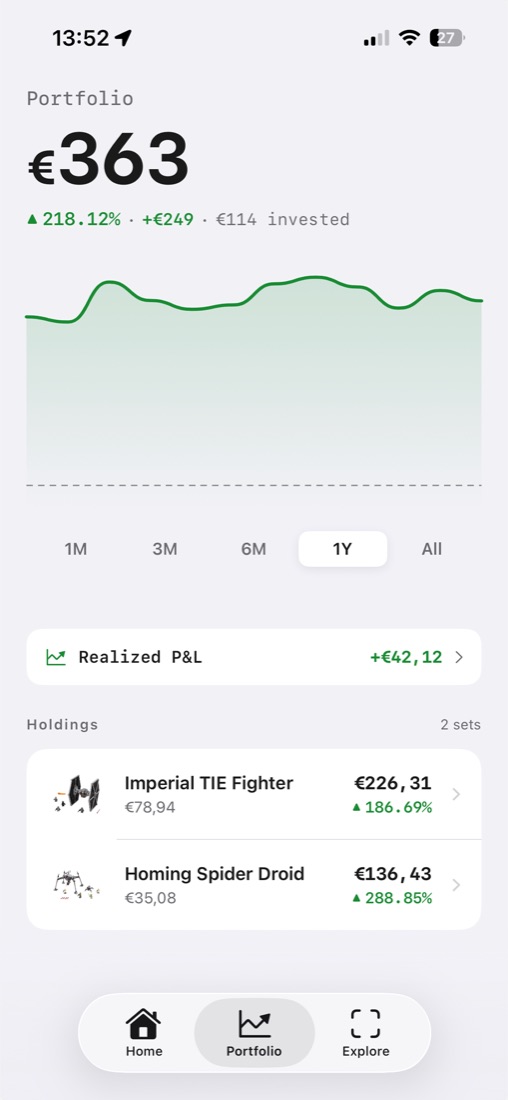
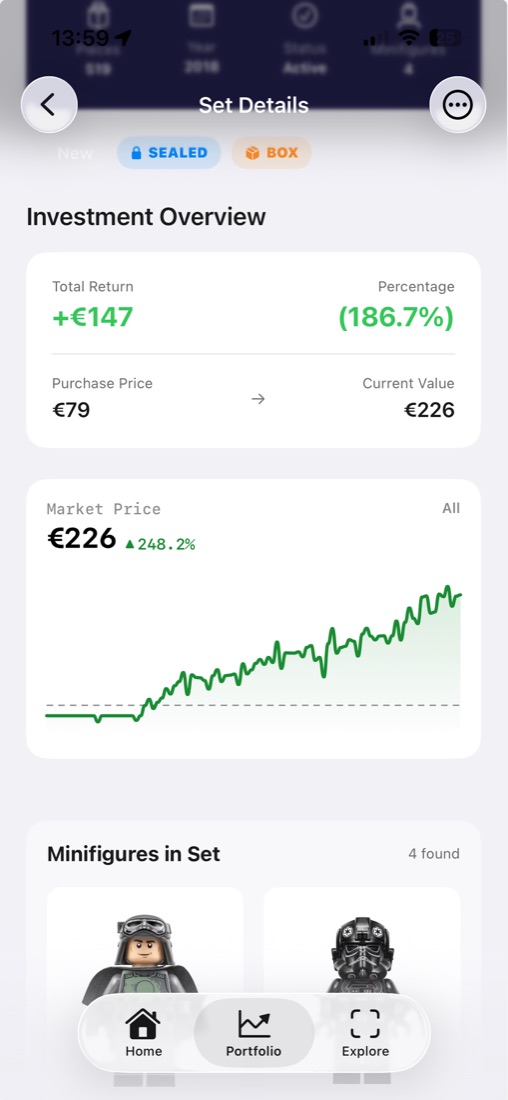
A collection value on its own answers “what is it worth?”. The question most collectors are really asking is “am I up?”. For that the app needs to record what you paid and when, and show:
- your gain or loss in money and in percent, per set and overall;
- a yearly return, so a set held for six years and one held for six months can be compared fairly;
- realized profit from sets you have sold, kept separate from the sets you still hold.
4. Retirement status from LEGO itself
Retirement is when values start to move, and when sets on your wishlist become hard to find. A good tracker tells you which of your sets are on LEGO.com’s retiring-soon list, which are still on sale, and which have retired. Be wary of confident “retires on” dates: LEGO doesn’t publish them, so they are estimates. The retirement guide explains the signals.
5. A scanner for sets and minifigures
Typing in set numbers is fine for five sets and painful for two hundred. A camera scanner should recognise a set from the box, the built model or the instruction booklet, and it should handle minifigures too, which have no number printed on them at all. Test it on a loose minifigure before you rely on it.
6. Alerts, history and the rest
- Price history charts, ideally going back years, so you can tell a trend from a spike.
- Price alerts: set the price you would pay for a set and get a notification when the market reaches it.
- Your currency. Values converted once and consistently, not a mix of dollars and euros.
- Cloud sync and sign-in, so a new phone doesn’t mean starting again.
- Sharing, if you want it: a public collection page you can turn on and off.
7. Pricing you understand before you start
Many collection apps are subscriptions with a free trial that becomes paid automatically. That is normal, but check three things before you start one: how many sets the free plan includes, whether a trial needs a payment method, and what it renews at. On iPhone, trials and subscriptions are managed in Settings › Apple Account › Subscriptions, and you can cancel there at any time.
BrickStats’ free plan tracks up to 5 sets with no trial and no payment needed. Pro (unlimited sets, full price history, the scanner and portfolio charts) is monthly, yearly or a one-time lifetime purchase; only the yearly plan has a free trial, and only if you choose it.
The five-minute test for any LEGO value app
- Look up three sets you know well: one recent, one retired, one obscure.
- Compare each value with completed sales on a marketplace, filtered to sold items in the same condition. Within 10–20% is good. Double is not.
- Check sealed vs used. Does the app show two prices, and are they far apart?
- Look for zeros. Any $0 value, or a set missing a price without saying why, will distort your total.
- Scan a minifigure. If it can’t find it, you will be typing a lot.
How BrickStats lines up
| What to look for | BrickStats |
|---|---|
| Realistic prices, updated daily | Median of the cheapest clean sealed listings, delivered, repriced daily for 22,000+ sets |
| Sealed and used separately | Yes |
| No fake $0 values | An unknown price shows as unknown, never as $0 |
| Purchase price, return, yearly return | Yes, each set is a position with its own return |
| Realized profit and loss | Yes, recorded when you sell a set |
| Retirement status | Last chance, On sale and Retired, checked daily against LEGO.com |
| Scanner | Sets and minifigures, from box, model or instructions (Pro) |
| Price alerts | Yes, at the price you choose |
| Currencies | USD, EUR, GBP, CAD and AUD |
| Sync and sign-in | Cloud sync with Apple or Google sign-in |
| Free plan | Up to 5 sets, no trial or payment needed |
| Platforms | iPhone and iPad; the website shows every set’s value |
Frequently asked questions
What is the best app to track a LEGO collection?
The best LEGO collection tracker is one with realistic prices (not an average of asking prices), separate sealed and used values, purchase prices with your return, retirement status from LEGO.com and a scanner for sets and minifigures. BrickStats does all of these on iPhone, free for up to 5 sets.
Why does my LEGO app show values that are too high?
Usually because its prices are averages of asking prices. Overpriced listings that never sell pull the average up. A median of the cheapest clean listings, or completed sales, is much closer to what a set really goes for.
Is there a LEGO minifigure scanner app?
Yes. BrickStats’ scanner identifies sets and minifigures from the camera, from the box, the built model or the instruction booklet. It is part of BrickStats Pro.
Is there a free LEGO collection tracker?
BrickStats is free for up to 5 sets, with no trial or payment method required. Pro removes the limit.
Can I track what I paid for my LEGO sets?
In BrickStats each set records what you paid and when, and shows your gain, percentage return and yearly return. When you sell, the profit moves to a realized P&L total.